Loading and Unloading Filament
Filament Feeding Options and How to Use the Filament Load and Unload Macros.
Loading Filament
HSP1-I has multiple options for installing spools and feeding filament to the printheads.
Option 1a: Integrated Filament Bay
The HSP1-I features two built-in spool holders inside a built-in filament bay on the right side of the machine. The filament bay is designed to accommodate up to two 10Kg spools. The lower spool holder feeds into the right printhead (E1), while the upper spool holder feeds the left printhead (E0).
Follow the steps below for loading filament into the integrated filament bay.
Install the spool onto the appropriate spool holder for the desired printhead.
Trim the end of the filament to an angled point and feed it into the appropriate feed tube. Be sure to feed filament all the way through the tube and out of the filament monitor. The trimmed end of the filament should be between the filament monitor and the extruder.
Insert the trimmed end of the filament into the top of the extruder until it is in contact with the drive gears.

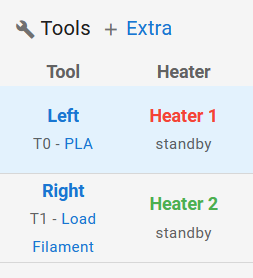
Depiction of the tools section of the web interface. The left tool is selected and loaded with PLA. The right tool has no filament loaded and says "Load Filament". Tap the "T# - Load Filament" button under the tool name, select the material you are loading, and wait for the selected tool to heat up.
Once the tool has heated up, ensure the filament is pressed against the drive gears of the extruder and hit "Ok" on the prompt. The extruder will now feed in the new filament and purge out the old filament. Once complete, the tool heaters will turn off.
Option 1b: PrintDry Pro
The filament bay is spacious enough for a PrintDry Pro to be positioned inside. One or both tools can be fed via the dryer. In order to avoid issues when closing the door, we recommend using the outlet ports on the short side of the dryer. Follow the same steps as above on how to load filament.
Option 2: Alternate Filament Paths
The HSP1-I also has external filament ports on the sides and rear of the machine. These can be used to feed filament from larger spools that will not fit in the filament bay.
Unloading Filament
Unloading filament from the machine follows a similar process to loading filament:
Tap the same button under the tool name used during the loading steps.
You will be given two options-"Change Filament" or "Unload Filament". Tap "Unload Filament" and the tool will heat up.
After the tool is heated, the filament will automatically be retracted. Be sure to remove it from the extruder and trim the end before pulling it back through the feed tube. Tuck the free end into the holes in the spool to prevent it from tangling.
Last updated